We're building the future of agentic promotions. Sign up for early access!
Sign up
We're building the future of agentic promotions. Sign up for early access!
Sign up 
If you search for “Shopify Plus” right now, you’ll find plenty of articles. Most of them will quote the $2,300/month price, list a handful of features, and wrap up with a confident “it’s worth it for enterprise brands.” What most of them won’t tell you is that Shopify Plus in 2026 looks meaningfully different from the platform those articles are describing.
Checkout.liquid, the feature that gave Plus merchants deep control over the checkout experience, is gone. The B2B landscape has shifted significantly. And the pricing structure is more nuanced than any headline number suggests.
This guide cuts through the noise. You’ll get an accurate picture of what Shopify Plus is today, what’s changed, what it actually costs, when it makes sense to upgrade, and, importantly, when it doesn’t.
Shopify Plus is Shopify’s enterprise-tier plan. It’s built for high-growth DTC brands, high-volume B2B sellers, and any merchant who needs capabilities that standard Shopify plans simply can’t deliver: deep checkout customization, advanced automation, multi-store management, and enterprise B2B workflows.
Shopify positions it for merchants doing between $1M and $500M in annual revenue, though you’ll find stores at both ends of that range. The upgrade isn’t just about getting more features; it’s about unlocking a fundamentally different level of control over your store’s infrastructure.
The key word there is infrastructure. Shopify Plus gives you the foundation. What you build on top of it is up to you.
Most guides still describe Shopify Plus the way it worked two or three years ago. Here’s what’s actually different now.
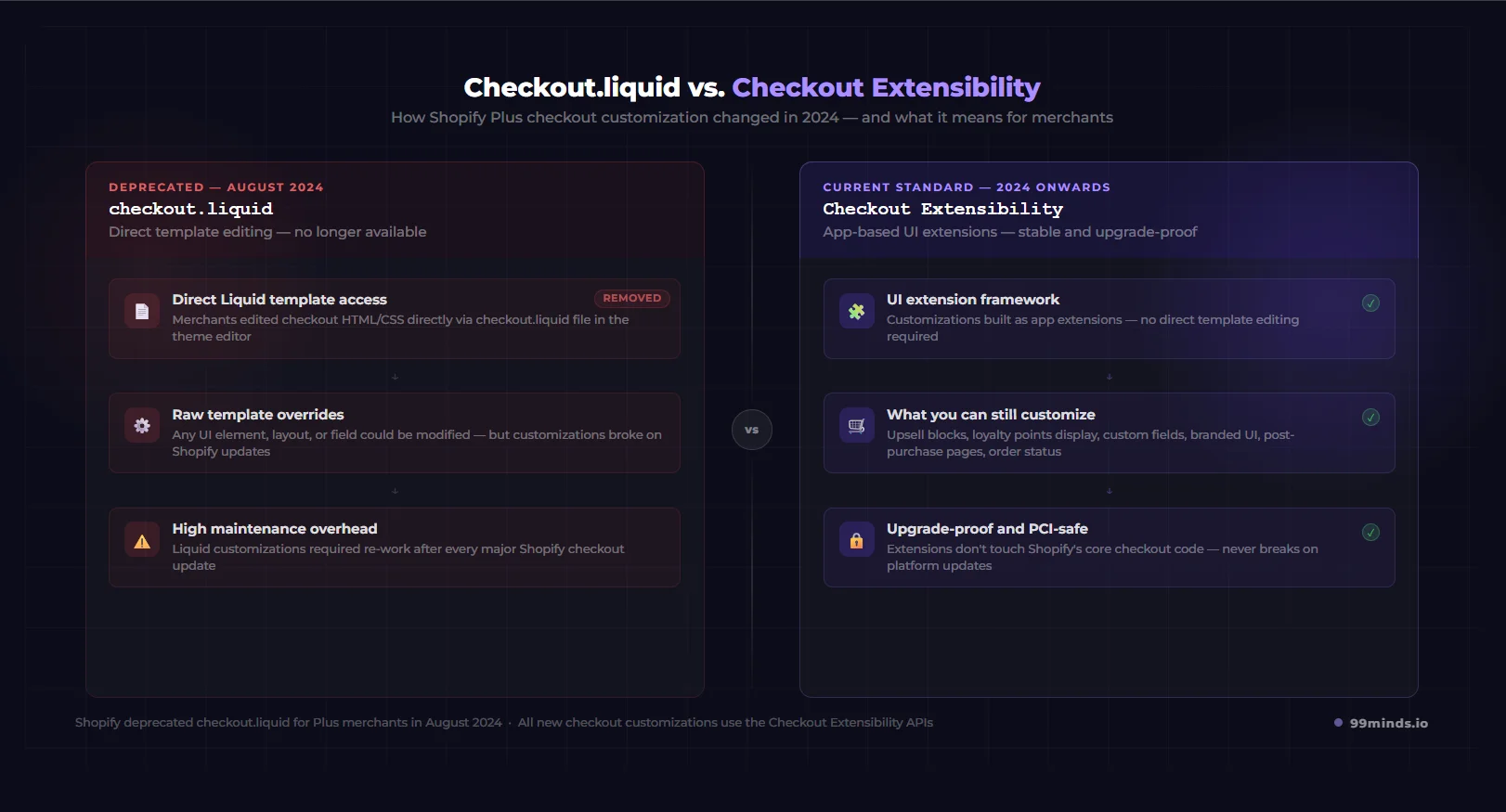
For years, checkout.liquid was the reason serious merchants upgraded to Shopify Plus. It gave you direct access to the checkout template, letting you modify the checkout flow in ways that weren’t possible on standard plans.
Shopify deprecated checkout.liquid in August 2024. If you’re reading an article that still lists it as a Shopify Plus benefit, that article is out of date.
What replaced it is Checkout Extensibility: a UI extension framework that lets you customize the checkout experience through apps and Shopify’s extension APIs rather than by editing the checkout template directly.
Here’s what that means in practice:
What you can still customize:
What you can’t change:
The practical upside of Checkout Extensibility is that customizations built with it are more stable: they don’t break when Shopify updates its checkout, which was a constant headache with checkout.liquid. The tradeoff is that some highly specific customizations that were possible with raw Liquid templates aren’t achievable through extensions alone.
If checkout customization is the primary reason you’re considering Shopify Plus, the new model still delivers, just through a different mechanism.
This is the nuance that almost no guide covers, and it’s important if B2B selling is your main reason for evaluating the upgrade.
Since 2024, Shopify has made a range of B2B functionality available on lower-tier plans through Shopify Markets and incremental platform updates. You can now set up basic B2B pricing, draft orders, and simple wholesale workflows without Plus.
What remains exclusive to Shopify Plus on the B2B side:
The bottom line: if you need basic B2B functionality, you may not need Plus. If you need enterprise B2B, the kind where business customers have company accounts, custom pricing catalogs, and structured payment terms, Plus is still the platform for it.
Curious about how loyalty programs fit into B2B? B2B loyalty programs have their own distinct playbook, and they work particularly well when layered on top of Shopify Plus’s native B2B infrastructure.
Shopify Flow is the automation tool exclusive to Shopify Plus, and it’s expanded considerably through Shopify’s recent Editions releases.
In the Winter 2025 and Summer 2025 Editions, Shopify added new Flow triggers, expanded API access for automation, and deepened the integration between Flow and third-party apps.
Practical Flow use cases that matter for larger merchants:
The combination of Flow and a loyalty platform like 99minds is particularly powerful here. You can set up triggers that automatically issue rewards, upgrade tiers, or notify customers of their status, all without manual intervention.
Here’s a complete breakdown of what comes with Shopify Plus today.
As covered above, Shopify Plus merchants get full access to Checkout Extensibility APIs, letting them build custom checkout experiences through apps and UI extensions. This includes upsell blocks, custom fields, loyalty integration, branded UI, and post-purchase pages.
Shopify Flow is a no-code automation tool that lets you build trigger-based workflows across your store. It connects to hundreds of apps and can automate almost any repetitive process in your operation, from order management and customer tagging to marketing triggers and inventory alerts.
For merchants with significant order volume, Flow alone can save dozens of operational hours per month.
Shopify Plus includes nine expansion stores in addition to your primary store, 10 storefronts total, all under one Plus subscription and one billing entity.
Expansion stores are commonly used for:
Each expansion store is a full Shopify store with its own theme, domain, and product catalog. This is one of the more underappreciated features of Plus for internationally expanding merchants.
Beyond what’s now available on standard plans, Shopify Plus gives you the full B2B toolkit: company accounts with multiple locations and buyer roles, custom product catalogs with tiered pricing, payment terms and invoicing, and a self-service portal so business buyers can manage their own accounts.
Standard Shopify plans cap the number of staff accounts. Shopify Plus removes that cap entirely, which matters for larger teams managing multiple storefronts, regions, or B2B operations. You also get more granular permission controls for staff roles.
Most articles stop at “$2,300/month.” Here’s the full picture.
Shopify Plus starts at $2,300/month on an annual contract. Month-to-month pricing is available but higher. For most merchants, the annual contract is the standard.
For larger merchants, pricing is negotiable. Shopify has a sales team that works with enterprise accounts, and merchants at significant GMV levels often negotiate custom pricing, particularly if they’re migrating from another platform.
This is the most misunderstood part of Shopify Plus pricing, and almost no competitor article explains it clearly.
Once your store exceeds approximately $800K in monthly GMV (roughly $9.6M annually), Shopify transitions you from the flat $2,300/month fee to a Variable Platform Fee: a percentage of your monthly revenue. The VPF currently sits at around 0.25% of monthly GMV.
In practice: if you’re doing $1M/month in revenue, your platform fee under the VPF would be approximately $2,500/month. At $2M/month, it would be around $5,000/month. This replaces the flat fee rather than adding to it.
For most merchants below the VPF threshold, the flat $2,300/month is what they pay. If you’re approaching or above that threshold, it’s worth understanding how the VPF scales with your revenue.
This is where Plus delivers some of its clearest ROI at scale.
Standard Shopify plans charge transaction fees when you use a third-party payment processor (not Shopify Payments):
Shopify Plus reduces the third-party transaction fee to 0.15% per transaction.
On $200,000/month in revenue processed through a third-party gateway, the difference between Advanced (0.5%) and Plus (0.15%) is $700/month in transaction fee savings alone. At $500K/month, that gap is $1,750/month, nearly the full cost of the platform.
The $2,300/month covers the platform. Here’s what you’ll typically spend on top of it:
A realistic total cost of ownership for a Shopify Plus merchant:
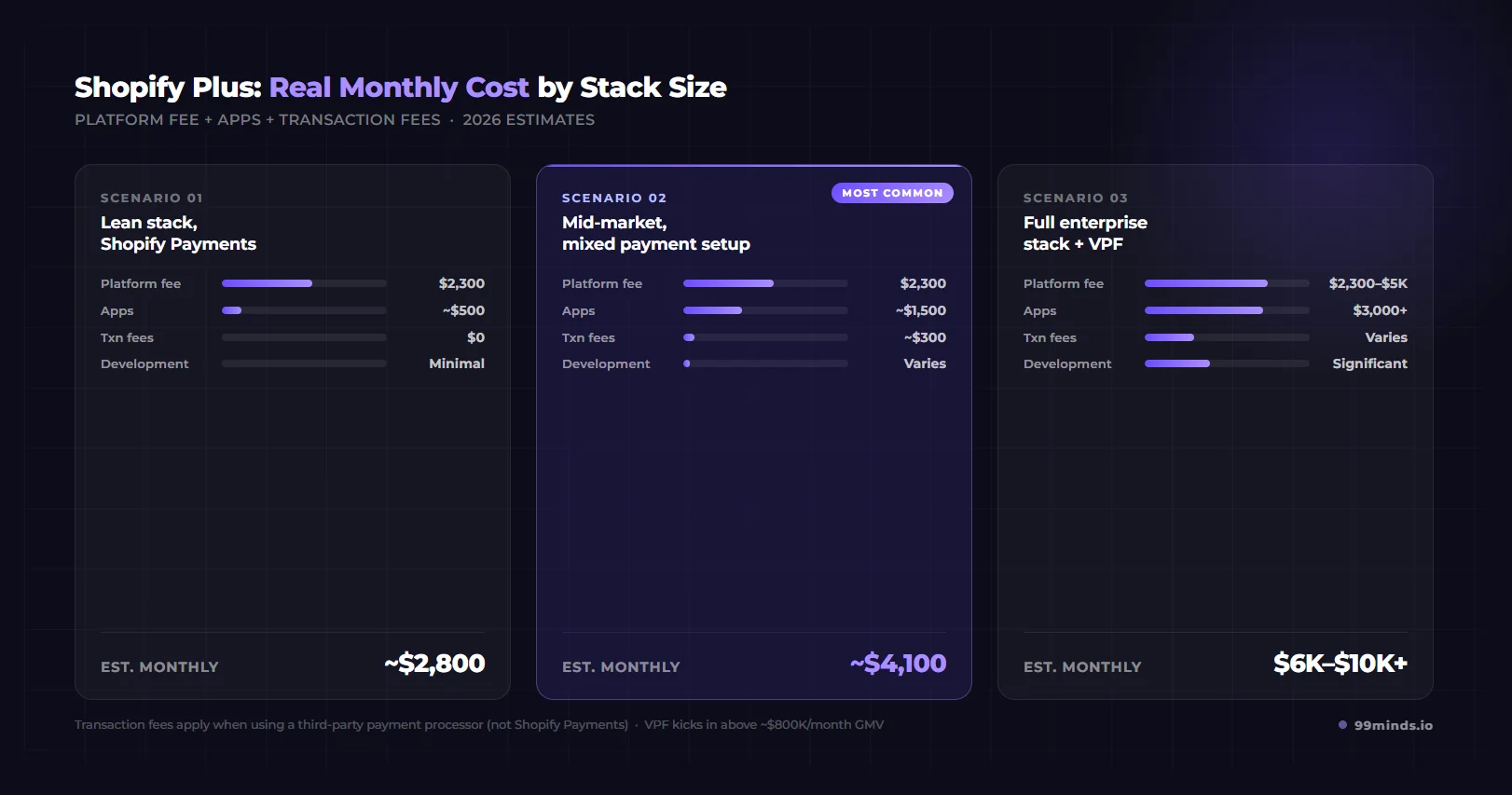
| Scenario | Platform Fee | Apps | Transaction Fees | Monthly Total |
|---|---|---|---|---|
| Lean stack, Shopify Payments | $2,300 | $500 | $0 | ~$2,800 |
| Mid-market, mixed setup | $2,300 | $1,500 | $300 | ~$4,100 |
| Full enterprise stack | $2,300-$5,000 | $3,000+ | Varies | $6,000-$10,000+ |
The break-even calculation depends on your payment processor situation.
If you’re using Shopify Payments exclusively, the upgrade from Advanced ($399/month) to Plus ($2,300/month) is a ~$1,900/month increase. The ROI comes from operational efficiency, Flow automation, checkout customization, and B2B capabilities, not fee savings.
If you’re using a third-party payment processor, the transaction fee savings are significant. At around $550,000-$600,000/month in GMV, the 0.35% difference in transaction fees (0.5% on Advanced vs. 0.15% on Plus) covers the cost difference between the two plans. Everything beyond that is net savings.
If you’re evaluating Shopify Plus, you may also be looking at BigCommerce Enterprise and Salesforce Commerce Cloud. Here’s a grounded comparison.
Both are SaaS enterprise platforms, which already puts them ahead of on-premise solutions in terms of total cost of ownership and maintenance overhead.
Where Shopify Plus tends to win:
Where BigCommerce Enterprise tends to win:
One thing worth noting: 99minds works natively with both platforms. If you’re running BigCommerce Enterprise today and considering a switch to Shopify Plus, your loyalty, referral, and store credit programs don’t have to start from scratch; they can migrate with you.
Salesforce Commerce Cloud (SFCC) is a different category of enterprise platform. It’s deeply integrated with the broader Salesforce ecosystem, which makes it compelling for large enterprises that are already running Salesforce CRM, Marketing Cloud, and Service Cloud.
Where Shopify Plus tends to win:
Where Salesforce Commerce Cloud tends to win:
The honest assessment: for most DTC and mid-market B2B merchants, Shopify Plus delivers more value per dollar than SFCC. SFCC makes more sense for large enterprises where the Salesforce ecosystem integration is a core business requirement, not just a nice-to-have.
99minds supports Salesforce Commerce Cloud as well. So regardless of which enterprise platform you land on, the retention infrastructure travels with you.
Here are the clearest signals that it’s time to make the move.
If you’re processing high volumes through a third-party payment processor, run the transaction fee math. At certain GMV levels, Plus pays for itself in fee savings before you count any other benefit.
More broadly, high-volume flash sales and product launches are a strong indicator: standard Shopify plans have checkout capacity limits that Shopify Plus removes. If you’ve experienced checkout degradation during a major launch, that’s a sign.
You’re probably ready for Plus if your ops team is spending significant time on manual processes that Shopify Flow could automate, if you’re managing multiple storefronts and need unified admin visibility, or if you need checkout experiences that aren’t possible on standard plans, such as loyalty point display at checkout, custom B2B form fields, or upsell blocks tied to customer segments. Any one of these signals suggests the platform is becoming a ceiling rather than a foundation.
You’re selling to business buyers who need company accounts, custom catalogs, and payment terms, not just a discounted price list. You’re expanding to three or more international markets and need separate storefronts with distinct experiences, currencies, and product selections.
Your integrations require higher API rate limits than standard plans allow. You need to build custom storefront experiences using headless architecture. Your development team is hitting limits in what they can build within standard Shopify’s constraints.
Most articles won’t tell you this, but here it is: Shopify Plus is not the right move for every growing store.
You probably don’t need Plus if:
The honest truth is that upgrading before you’re ready creates cost without value. The features that make Plus worth it (checkout extensibility, Shopify Flow, expansion stores, enterprise B2B) only justify the price when you actually need them at scale.
If you’re on the fence, run the math on your transaction fees, list the specific Plus features you’d use, and see if the ROI case holds up. If it doesn’t, stay on Advanced until it does.
Getting on Shopify Plus gives you the infrastructure. Now comes the question of what you build on top of it.
One of the most valuable things you can do as a Shopify Plus merchant is build a proper retention engine. The right set of loyalty programs for Shopify Plus merchants, referral systems, and store credit keeps customers coming back and drives incremental repeat revenue. 99minds is built specifically for this layer.
Here’s how Shopify Plus unlocks better retention capabilities:
Checkout Extensibility + loyalty: 99minds integrates with Checkout Extensibility to display a customer’s loyalty points balance directly in the checkout flow, let them redeem rewards at the point of purchase, and surface personalized loyalty offers. This reduces cart abandonment and increases conversion among your existing customer base.
Shopify Flow + loyalty automation: You can use Shopify Flow to trigger loyalty actions automatically. A customer hits a VIP tier spend threshold? Flow triggers a tier upgrade. A customer hasn’t purchased in 90 days? Flow triggers a win-back email with a loyalty bonus offer. These workflows run without any manual involvement from your team. For ideas on how other brands are setting this up, browse loyalty program examples from merchants on Shopify Plus.
Multi-store loyalty: With Plus’s expansion stores, you can run multiple storefronts under one subscription. 99minds syncs loyalty points, store credit, and rewards across all your storefronts in real time, so customers earn and redeem seamlessly whether they’re shopping your US store, UK store, or wholesale portal.
Referral programs at scale: 99minds includes a full referral program management system that integrates with Shopify Plus. As your brand grows, referral programs become one of the highest-ROI customer acquisition channels you have. You can also set up a dedicated referral engine that runs on autopilot across all your Plus storefronts.
Store credit for returns: Returns on Shopify Plus at scale are significant. 99minds store credit lets you issue store credit instead of refunds, keeping revenue within your business rather than sending it back to the customer’s payment method.
99minds works natively with Shopify Plus, BigCommerce Enterprise, and Salesforce Commerce Cloud. You can install it from the Shopify App Store and be running your first loyalty program within hours.
Shopify Plus in 2026 is a genuinely strong enterprise platform, but it’s not the same platform that most articles describe. Checkout.liquid is gone, B2B has evolved, and the pricing structure has layers that the “$2,300/month” headline doesn’t capture.
Here’s what matters most:
First, the upgrade decision should be driven by specific feature needs and financial thresholds, not by company size or a general sense that you’ve “outgrown” Shopify. Run the transaction fee math. Identify which Plus-specific features you’d actually use. If the ROI case is there, make the move.
Second, if you’re already on Plus or you’re moving to Plus, think about what you’re building on top of it. The platform gives you the infrastructure. Loyalty programs, referrals, store credit, and gift cards are what you build on that infrastructure to drive customer retention and repeat revenue.
99minds is built to work natively with Shopify Plus. Whether you need a points-based loyalty program, a referral engine, or store credit for returns, you can launch and run all of it from one platform, integrated with Checkout Extensibility, connected to Shopify Flow, and synced across all your expansion stores.
Ready to build the retention layer on top of your Shopify Plus infrastructure? Start your free 99minds trial and get your first loyalty program running today.