
A point reward system gives customers points every time they shop, and those points turn into rewards that bring them back. For brands with both a website and physical stores, it’s one of the simplest ways to turn one-time buyers into regular customers.
The challenge is keeping members active. Deloitte’s 2025 Consumer Loyalty Program Survey found that the average person joins eight loyalty programs but only uses five of them, and 40% say they sometimes forget to use their rewards.
This guide shows you how to avoid that. You’ll learn how points work, how to set up a points program in eight steps, how to run it after launch, and which numbers to track.
TL;DR
- A point reward system lets customers earn points when they shop, then use those points for rewards
- If you have stores and a website, points should work the same way in both places
- Decide what each point is worth before you launch, and make sure your profit can cover it
- Let customers turn points into store credit or gift cards, so the value stays with your business
- Plan for unused points, expiry dates, and returns from day one
- Track how many points get used, how often members come back, and whether they shop in both channels
What Is a Point Reward System?
A point reward system rewards customers with points each time they buy or complete an action you choose, such as signing up or leaving a review. Customers then trade those points for rewards like discounts, free products, store credit, or gift cards.
Points work differently from a regular discount. A discount is used once at checkout and then it’s gone. Points stay in the customer’s account and keep growing, which gives customers a clear reason to return and use them.
Most points-based loyalty programs start with points alone. Some later add VIP levels on top, which turns them into a tiered loyalty program where customers who spend more unlock better rewards.
How a Loyalty Points System Works
A loyalty points system works as a simple loop: customers join, earn points, check their balance, use their points, and come back to earn more. Here’s each step, online or in-store:
- The customer joins, on your website or at the register
- They earn loyalty points when they buy or complete bonus actions
- They check their points in their account, on a receipt, or in their phone’s wallet
- They use their points to get a reward
- They come back to earn more
You decide the rules for each step. That means what earns points, what each point is worth, what customers can get with them, and when points expire. The setup steps below cover each one.
If you sell in stores and online, one rule matters more than the rest. The customer should see the same number of points everywhere, whether they ask at the register, log in online, or open their phone’s wallet.

Why Brands Selling Online and In-Store Need a Reward Point System for Customers
Brands that sell online and in stores need a reward point system because it ties both channels to one customer and gives that customer a reason to come back to either one. Rewards also change how people shop. In the same Deloitte survey, 72% of people said a loyalty program makes them more likely to buy from their favorite brand. And 56% said they spend more because of it. One thing to note: people were answering about the program they like best, so a weak program won’t get these results.
If you have physical stores, a reward point system for customers helps in a few more ways:
- It links your store shoppers and your online shoppers, who are often the same people
- It gives your staff an easy reason to ask for a customer’s email or phone number
- It shows you what each customer buys, and where they buy it
- It gives online shoppers a reason to visit your store, and store shoppers a reason to order online
But there’s a catch. All of this only works if points follow the customer everywhere. If points earned in your store can’t be used online, the customer ends up with two separate relationships with your brand.
How to Set Up a Point Reward System Step by Step
To set up a point reward system, choose a goal, set your earning rules and point value, decide on rewards, expiry, and returns, connect your sales channels, and then launch. Getting the setup right matters, because McKinsey found that about two-thirds of established loyalty programs fail to deliver value. Follow the eight steps below in order, since each one builds on the step before it.
Step 1: Pick the one behavior your points program should drive
Start with one goal. If your point reward system tries to do everything at once, it usually does nothing well.
Here are some common goals:
- Getting first-time buyers to buy a second time
- Getting regular customers to visit more often
- Getting customers to spend more per order
- Getting online shoppers into your stores, or store shoppers onto your website
Before you launch, write down your repeat purchase rate (the share of customers who buy more than once) and your average order value (how much customers spend per order). You’ll need these numbers later to see if the program is working.
Step 2: Set rules for how customers earn loyalty points
Keep your main rule simple: customers earn points for every dollar they spend. Use the same rule in your store and online. Different rules in each channel confuse customers and slow down your staff at checkout.
Then add three or four bonus actions, no more:
- Creating an account
- Writing a product review
- Referring a friend who buys
- A birthday bonus
That’s enough. More rules make the program harder to explain at a busy checkout.
You can also add one bonus that matches your goal from Step 1. For example, give extra points the first time an online shopper buys in your store. Set limits on bonus actions too, like a cap on review points each month, so nobody abuses the program.
Step 3: Decide how much each point is worth
In a point reward system, each point should be worth a small, fixed dollar amount that your profit can easily cover. Many brands rush this step, and it’s where programs lose money without anyone noticing. Two simple formulas help:
- Value of one point = reward value ÷ points needed for that reward
- How much you give back per dollar = points earned per $1 × value of one point
Here’s how a few example setups work out. These are examples only, not industry targets:
| Customers earn | Customers can get | Value of one point | You give back per $1 |
|---|---|---|---|
| 1 point per $1 | $1 off for 100 points | $0.01 | 1% |
| 1 point per $1 | $5 off for 100 points | $0.05 | 5% |
| 5 points per $1 | $1 off for 100 points | $0.01 | 5% |
Look at the last two rows. Both give back 5%, but they feel different to the customer. Earning lots of points feels generous. A high value per point feels premium.
Now compare that percentage with your profit margin (the share of each sale you keep after product costs). What you give back must stay well below it. If some products have a thin margin, leave them out of the program or give them fewer points. Setting this right before launch is much easier than cutting rewards later, which customers rarely take well.

Step 4: Let customers redeem points for gift cards and store credit
The best reward for brands that sell online and in stores is store credit or a gift card, because customers can spend it in either channel. Most programs only offer discount codes or free products. Those still work, but credit and gift cards give customers more freedom and keep the value with your business.
Here’s why it works so well:
- The money stays with your business, because it can only be spent with you
- Customers can use it at your store checkout or on your website
- You can set a limit on how much credit is used per order, so you still make full-price sales
- Customers see a dollar amount, which is easier to understand than a pile of points
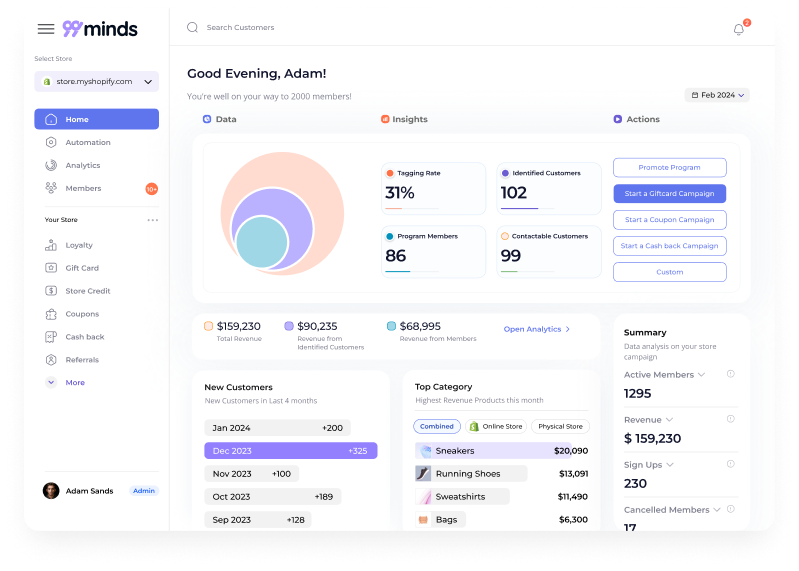
In 99minds, a customer’s points, store credit, and cashback are all saved on their customer account. Customers spend points and store credit through discount codes or gift cards. You choose how much they can spend at once and whether they can combine it with other offers. You can still offer free products and discounts too, so customers have choices.
Step 5: Set expiry rules and plan for points liability
Points liability is the total value of points your customers have earned but not yet used or lost to expiry. Every point is a small promise, and across all your members those promises add up, so plan for them from the start.
Some points never get used. This is called breakage (the share of points that expire or are forgotten), and it works a lot like gift card breakage. Unused points lower your costs, but don’t count on them. A program that only works because people forget their points won’t make anyone loyal.
There are two common ways to set expiry rules:
- After inactivity: points expire if the customer doesn’t earn or use any for a while
- On a fixed date: points expire a set time after they’re earned, or at the end of each year
Match the expiry time to how often people buy from you. If customers buy every few weeks, a short window pushes them to come back. If they only buy a few times a year, a short window just punishes your best customers.
Always warn customers before points expire. 99minds sends automatic reminder emails when points are about to run out, which often brings customers back to use them. To learn how to record unused points in your books, talk to your accountant.
Step 6: Decide how points work on returns and refunds
When an item is returned, the points earned on it should be removed, and the refund can go to store credit to keep the value in your business. Returns are where points programs often go wrong, especially at the store counter, so write these rules down before you launch:
- Remove the points a customer earned on items they return
- Decide what happens if they already used those points, like taking it off the refund amount
- Offer store credit as a refund option, instead of money back to their card
That last rule is important. Refunding to store credit is one of the simplest ways to reduce return and exchange costs, because the money stays in your business. And the customer now has credit to spend, so they’re likely to come back.
In 99minds, automatic workflows can remove the points from an order when that order is refunded. Nobody has to fix balances by hand. Add your returns rules to the program terms, and teach your store staff, since most points arguments happen at the counter.
Step 7: Connect your POS and online store to one points balance
Your POS (point of sale, the checkout system in your store) and your online store should share one points balance, so customers can earn in one place and spend in the other. For brands that sell in more than one place, this step decides whether the program works at all.
If the two don’t share one balance, problems show up fast:
- A customer earns points at the register, then logs in online and sees fewer points
- A customer spends the same points twice, once in-store and once online
- Store staff can’t check a customer’s points when asked
- You see two half-pictures of the same customer in your reports
With 99minds, points earned in your store appear online right away, and the same goes for gift card and store credit balances. It works with Shopify and BigCommerce online, and with store checkout systems like Heartland POS, Lightspeed, Shopify POS, and Square.
Bfearless, a premium lifestyle store, is a good example. When it moved from Square to Heartland, it started a points program. Customers earned one point per dollar, and every 100 points gave them a coupon they could use online or in-store. The Bfearless loyalty program case study shows sign-ups went up 20% in the first three months. Average order value went up 15%, and members bought again 35% more often than non-members.
Step 8: Launch and promote your points and rewards system
Launch your point reward system with a small test, then promote it in every place customers shop. Start with your staff and a few customers. This helps you catch problems, like points that don’t show up, before everyone sees them.
Then tell customers about it everywhere:
- Online: a banner on your homepage, a section on the account page, and a cart message showing points for that order
- In-store: a sign at the register, a line on receipts, and a short line your staff can say
- Email and SMS: a launch message to your current customers, with bonus points for joining
Your staff make the biggest difference. A cashier who asks “Want to earn points on this order?” will sign up more people than any banner.
Give Customers One Points Balance Everywhere
With 99minds, customers earn and use points, store credit, and gift cards in your store and on your website.
How to Run an Omnichannel Loyalty Program Once Points Are Live
Running an omnichannel loyalty program (one that works the same in your stores and online) mostly means keeping points in front of customers so they remember to use them. This matters because 40% of people sometimes forget their rewards.
Here’s how 99minds helps with the day-to-day work:
- Phone wallet passes: Members can save their points on a digital wallet pass on their iPhone or Android phone. The pass can also send a quick alert when they’re close to one of your stores
- Reminder emails and texts: Group customers by how many points they have or their VIP level, then send those groups to Klaviyo or Omnisend. Use them for “you’re close to a reward” messages, expiry warnings, and win-back offers
- Help for store staff: Staff can check points and apply rewards at the register, so shopping in-store feels the same as shopping online
- Bonus events: Run double-points weekends or extra points on slow-selling products, without changing your main earning rule
- Rewards in one place: Points, store credit, and gift cards all run on the same loyalty platform, so you can change your rewards without starting over
TasselsShoes.com shows how this works. The brand uses Heartland POS in its stores and Shopify online, with store credit, points, and gift cards working in both. Customers earn points for buying, referring friends, and engaging on social media. They can use points for discounts, special offers, or store credit, online or in-store. The brand also offers double points during busy seasons and on birthdays, and sends Klaviyo reminders about unused points. The TasselsShoes.com omnichannel case study reports 20% more repeat purchases.
Refunds are part of daily work too. With store credit software, your team can give credit for returns in-store or online, and customers can spend it in either place. If you also sell gift cards, running them on the same gift card software as your points keeps every balance in one place.
Loyalty Program KPIs That Show Your Rewards Point System Is Working
Loyalty program KPIs (key performance indicators) are the numbers that show whether your rewards point system is working. Compare them with the numbers you wrote down in Step 1:
| KPI | What it tells you | How to work it out |
|---|---|---|
| Sign-up rate | Do customers know about the program and want to join? | New members ÷ all customers in that period |
| Active member rate | Do members keep using the program after joining? | Members who earned or used points ÷ all members |
| Redemption rate | Are the rewards worth earning? | Points used ÷ points given out |
| Repeat purchase rate | Do members come back more than non-members? | Customers with two or more orders ÷ all customers, for members and non-members |
| Average order value | Do points make people spend more per order? | Sales ÷ number of orders, for members and non-members |
| Points you still owe | How much value is waiting to be used | Unused, unexpired points × value of one point |
| Cross-channel shoppers | Does the program connect your store and website? | Members who bought in-store and online ÷ active members |
Keep a close eye on your redemption rate, which is the share of points customers actually use. It matters because members who redeem are your most valuable ones: in the same McKinsey research, members who redeemed points spent 25% more than members who joined but stayed inactive. If your rate is low, rewards probably feel too far away. Try a smaller first reward, or make the value easier to see. If it’s high but customers aren’t coming back more often, they may just be using points as a discount on things they’d buy anyway.
99minds shows points, store credit, VIP levels, and referrals on one dashboard, so you don’t have to pull reports from different places.
Conclusion: Make Every Point Bring Customers Back
A point reward system works best when everything points to one goal. Pick the one thing you want customers to do. Set a point value your profit can cover. And give rewards customers can use anywhere, like store credit and gift cards. Plan for expiry dates, unused points, and returns before you launch, because that’s where most programs struggle later.
If you sell online and in stores, one shared points balance matters most. When points earned at the register show up online, and online points can be spent in your store, your program becomes more than a website feature. It connects every way a customer shops with you.
With 99minds, each customer gets one balance for points, store credit, gift cards, and wallet passes, and it works both at your register and on your website. Want to see how it would work for your brand? Book a demo, and our team will help you plan your point reward system.
Frequently Asked Questions on Point Reward Systems
What are reward points?
Reward points are like a loyalty currency. Customers earn them when they buy, or when they do things like sign up or refer a friend. The points add up in their account, and they can swap them for rewards such as discounts, free products, store credit, or gift cards. For example, a store might give one point per dollar and $1 off for every 100 points.Do loyalty points expire?
It depends on the program's rules. Some brands expire points after a customer stops shopping for a while. Others expire points a set time after they're earned, and some never expire them. If your points expire, pick a time that fits how often customers buy, and remind them before their points run out.How much is one loyalty point worth?
The brand decides. To find the value, divide the reward amount by the points needed to get it. If 100 points get $1 off, each point is worth one cent. Then multiply that by the points earned per dollar to see how much you give back. Make sure that number stays well below your profit.What is a good redemption rate?
Redemption rate is the share of points that customers actually use. There's no single right number, so watch how it changes over time. A low or falling rate usually means rewards feel too hard to reach. A high rate with no rise in repeat purchases can mean customers are just using points as a discount.What is the difference between a points system and a tiered loyalty program?
A points system is about earning and spending points. A tiered loyalty program adds levels, like silver and gold, and customers move up as they spend more. Higher levels get better perks, like extra points or early access. Many brands use both: points for everyday rewards, and levels for their best customers.Can loyalty points be converted to store credit?
Yes, if your loyalty platform allows it. Turning points into store credit shows customers a clear dollar amount they can spend online or in-store. The value also stays with your business. With 99minds, customers spend points and store credit through discount codes or gift cards, and you set the limits.Is a points reward system the right loyalty program for a small business?
Usually, yes, if customers buy from you often and you have room in your profits for rewards. A simple points reward system is easy to explain at the register and easy to run. It works less well for things people rarely buy, like furniture, because customers may never earn enough for a reward.Boost Customer Engagement with 99minds. The Ultimate Gift Card & Loyalty Solution!
Sign up for free