We're building the future of agentic promotions. Sign up for early access!
Sign up
We're building the future of agentic promotions. Sign up for early access!
Sign up 
If you’ve ever clicked a friend’s “get 20% off” link and wondered how the brand knew who sent you, that’s a referral link doing its job. It’s one of the simplest, most cost-effective tools in any ecommerce store’s growth toolkit, and yet most guides stop at a basic definition and leave you with more questions than answers.
This guide doesn’t do that. You’ll learn exactly what a referral link is, how the tracking works under the hood, where to share it in 2026, and how to set one up for your store.
A referral link is a unique URL assigned to an existing customer or partner. When someone clicks it and completes a qualifying action (a signup, a purchase, a subscription), the platform attributes that conversion to the referrer and triggers a reward for one or both parties. The mechanism behind it is simple: a unique identifier lives in the URL itself, and a first-party cookie preserves that identifier on the referee’s browser after the click, so the platform can still credit the right person even if the referee converts hours or days later instead of immediately.
In plain terms: your customer gets a link, they share it, their friend buys something using it, and both of them earn a reward. The link is what makes it trackable and scalable, turning a personal recommendation into a data point your business can measure, attribute, and reward automatically, without anyone having to remember a code or fill out a form.
Referral links are the tracking backbone of any referral program. They’re different from a generic promo code because they’re tied to a specific person, not just a campaign.

Referral links involve two parties: the referrer (your existing customer who shares the link) and the referee (the new person they’re sending your way). Here’s how the full journey plays out.
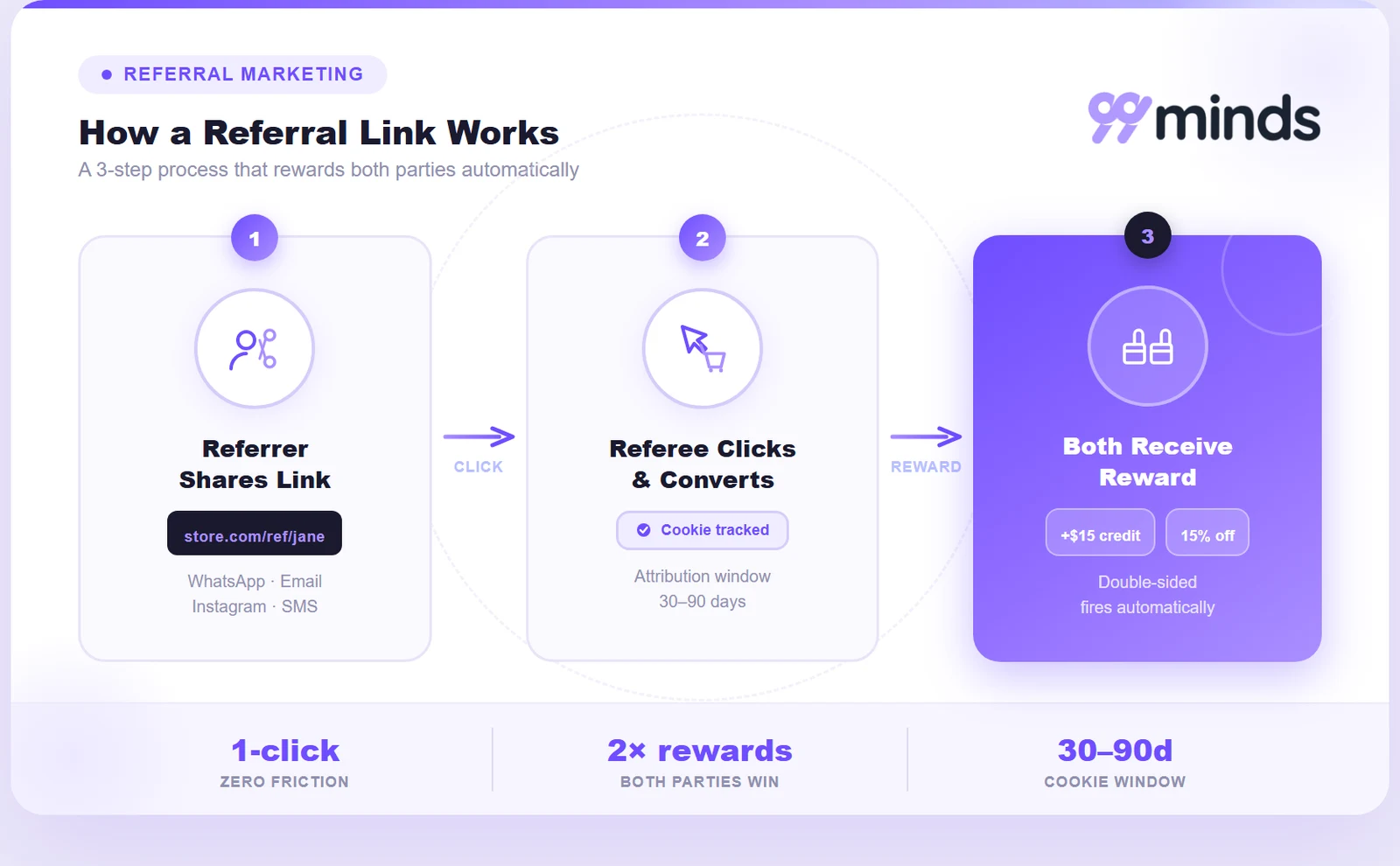
Every participant in your referral program gets a URL with a unique identifier appended to it. It might look like yourstoreurl.com?ref=jane123 or, with a branded structure, yourstoreurl.com/ref/jane.
The identifier is what separates Jane’s link from every other customer’s link. Without it, you’d have no way to know who deserves credit for the referral.
Branded and personalized URL structures (like /ref/jane) consistently outperform generic query strings in click-through rate. They look trustworthy, they’re easy to recognize, and they don’t scream “tracking parameter” to people who hover over links before clicking.
When Jane’s friend clicks the link, two things happen simultaneously:
That cookie is important. It means even if the referee doesn’t buy immediately, they can come back hours or days later and the referral credit still goes to Jane, as long as the cookie window hasn’t expired (usually 30 to 90 days, depending on how your program is configured).
Once the referee completes the action your program requires (completing a purchase, creating an account, subscribing), the platform matches that conversion back to the stored referral attribution and fires the reward automatically.
Both Jane and her friend get notified. Jane earns her credit, and her friend gets their new-customer incentive if your program is set up with double-sided rewards.
Jane shops at a Shopify store called Brand X. She shares her personal link: brandx.com/ref/jane. Her friend clicks it, lands on a page that says “Jane sent you 15% off your first order,” and buys a pair of sneakers. Jane’s account gets $10 store credit. Her friend saves 15%. Brand X acquires a new customer at a fraction of what a paid ad would cost.
That’s the whole loop in one click.
Most articles tell you that referral links “use a unique URL to track conversions.” That’s true, but it skips the part that actually matters for running a reliable program. Here’s what’s actually happening under the hood.
When a referee clicks your referral link, their browser stores a first-party cookie containing the referrer’s ID. This cookie persists across browser sessions for the duration of your cookie window.
The URL parameter (like ?ref=jane123) handles the immediate session. If the user converts in the same session, the parameter alone is enough to attribute the referral. The cookie is the backup layer: it covers the scenario where the referee bounces, closes the tab, and comes back three days later.
One limitation worth knowing: if a referee clears their cookies, switches devices, or uses a private/incognito window, the attribution can be lost. This is a known constraint of cookie-based tracking, and most referral platforms address it through additional fingerprinting methods.
UTM parameters are optional tags you can append to referral links to capture channel-level data in Google Analytics 4 or similar tools. A fully tagged referral link might look like this:
yourstoreurl.com?utm_source=referral&utm_medium=whatsapp&utm_campaign=summer-launch&ref=jane123
The ref=jane123 part attributes the referral to Jane. The UTM tags tell you where Jane shared her link (WhatsApp, email, Instagram, etc.).
This matters because without UTM tags, you know referrals are coming in but not which sharing channel is performing best. Once you know WhatsApp drives three times more referral conversions than email for your audience, you can design your sharing prompts accordingly.
Referral platforms typically use first-click attribution: the referral link that first brought a visitor to your site gets credit for the conversion, even if the customer later came back through a paid ad or organic search before buying. For example, if Jane’s link brings a visitor to your site on Monday but they don’t buy until they return through a Google search on Friday, first-click attribution still credits Jane for the sale, as long as the cookie window from that first click hasn’t expired.
This is the right default for referral programs because the whole point is to reward the person who introduced the customer to your brand. Crediting the last touchpoint instead would undervalue the referral and disincentivize sharing, since most of the value referral programs create comes from that first introduction, not whichever channel happens to close the sale.
Without fraud controls, referral programs attract abuse fast. Common exploits include self-referrals (a customer referring their own secondary email to claim both rewards) and coupon-hunting through referral links shared on deal sites.
Reliable referral platforms guard against this with IP filtering, device fingerprinting, email domain rules, and restrictions on referral link indexing by coupon aggregators. If you’re building a referral program manually, this is the hardest part to replicate, and it’s one of the strongest reasons to use a dedicated platform.
.webp)
Referral links and referral codes both serve the same purpose: attributing a new customer to the person who recommended your brand. The difference is in how they work and where they fit best.
| Referral link | Referral code | |
|---|---|---|
| Format | Unique URL | Short alphanumeric string |
| How shared | Clicked directly | Entered manually at checkout |
| Tracking | Automatic via URL parameter | Manual entry required |
| Best for | Digital channels, mobile sharing | In-store, offline, verbal sharing |
| Friction | Frictionless, one click | Requires the user to remember and type |
| Fraud risk | Slightly higher (bots can click) | Slightly lower (manual entry) |
For ecommerce, referral links win almost every time. They’re frictionless, automatically tracked, and shareable in a single tap from any device. Referral codes shine in contexts where a link can’t travel: in-store recommendations, podcast mentions, or verbal referrals at an event.
Many programs combine both: the referrer gets a link for digital sharing and a code for everything else, both tied to the same account.
You’ve got three paths here depending on where you are in building your program.
The fastest and most reliable option. A dedicated referral marketing platform generates unique referral links for every customer automatically the moment they join your program. You configure the reward structure, the qualifying action, the cookie window, and the fraud rules once. The platform handles every link, every attribution, and every reward after that.
For Shopify merchants, this is the go-to path. Install the app, set your program rules, and your customers get a shareable referral link inside their account dashboard without you needing to touch anything manually.
For small pilots or one-off campaigns before committing to a platform, you can hand-craft referral links:
yourstoreurl.com)?ref=jane123 (use the customer’s name or order ID as the unique identifier)&utm_source=referral&utm_medium=emailThe limitation is that you’ll need to track attributions in a spreadsheet and issue rewards manually. This doesn’t scale past a handful of advocates.
If you want to test the format of your links before investing in a full platform, 99minds’ free referral link generator lets you build UTM-tagged referral links in seconds. It’s useful for previewing your link structure, but it doesn’t handle tracking, rewards, or fraud prevention on its own, so it’s best treated as a starting point rather than a full solution.
Where your customers share their referral links determines how much volume your program generates. Here’s where referral sharing actually happens in 2026, and how to optimize for each channel.
WhatsApp is the highest-converting channel for personal referral sharing globally. A message from a trusted contact in a private thread carries more weight than any ad you can run: Nielsen’s Global Trust in Advertising report found that 92% of consumers trust recommendations from people they know over any other form of advertising. Pair the link with a pre-written message template to remove the friction of composing a message from scratch.
Good template: “Hey [Name], I’ve been ordering from [Brand] and thought you’d love it. Here’s a link to get 15% off your first order: [link]”
Supply this template inside your referral dashboard so customers can copy it with one click, which connects back to word of mouth marketing at its most natural.
Email still delivers the highest conversion rate for formal referral programs, especially for B2C ecommerce. The key is timing: don’t blast your whole list with a referral ask. Trigger the referral email at peak satisfaction moments:
These are the moments when a customer is most likely to feel good about your brand and actually want to share it. You can set up these triggers automatically with 99minds’ automated loyalty workflows.
Instagram Stories link stickers and TikTok bio links both allow direct referral link sharing. Micro-influencer referral programs (where regular customers with engaged audiences share their personal link) are growing fast here. The referral link acts as both the tracking mechanism and the call to action.
For Stories especially, make the landing page mobile-first: large CTA button, minimal form fields, and the referral offer front and center.
If your store has a mobile app layer, in-app share sheets are the gold standard. One tap from inside the app opens a native iOS or Android share picker, and the referral link travels to any platform the user chooses. There’s no copying, no navigating, no drop-off.
For Shopify stores without a dedicated mobile app, a prominent “Share your link” button inside the customer account page serves the same purpose on mobile browsers.
Asking customers to refer too early kills conversion rates. The best trigger points are the ones listed under email above, but the principle applies everywhere: prompt at high-satisfaction moments, not at the start of the customer relationship. A customer who just received their first order and loved it is a completely different prospect from a first-time site visitor.
Running a referral link program that actually grows requires more than just handing out links. Here are the six practices that consistently move the needle:
yourstore.com/ref/jane build more trust than generic query strings. The referral landing page should echo the referrer’s name (“Jane sent you a gift”) to reinforce the personal connection
A referral link is deceptively simple: it’s just a URL with a unique identifier. But behind that URL is a complete customer acquisition loop, one that converts at rates paid ads can’t touch because it runs on trust rather than targeting. Harvard Business Review research found that referred customers have 16% higher lifetime value and 37% better retention than customers acquired through other channels.
The two things that determine whether your referral link program succeeds are frictionless sharing (so customers actually use their links) and reliable tracking (so every conversion gets credited to the right person). Get both right, and you have a growth channel that compounds over time with zero incremental ad spend.
For Shopify merchants, the fastest path is a purpose-built platform that handles link generation, attribution, rewards, and fraud prevention automatically. 99minds’ referral software is built exactly for that. Start your free trial and have your first referral link program live today.