We're building the future of agentic promotions. Sign up for early access!
Sign up
We're building the future of agentic promotions. Sign up for early access!
Sign up 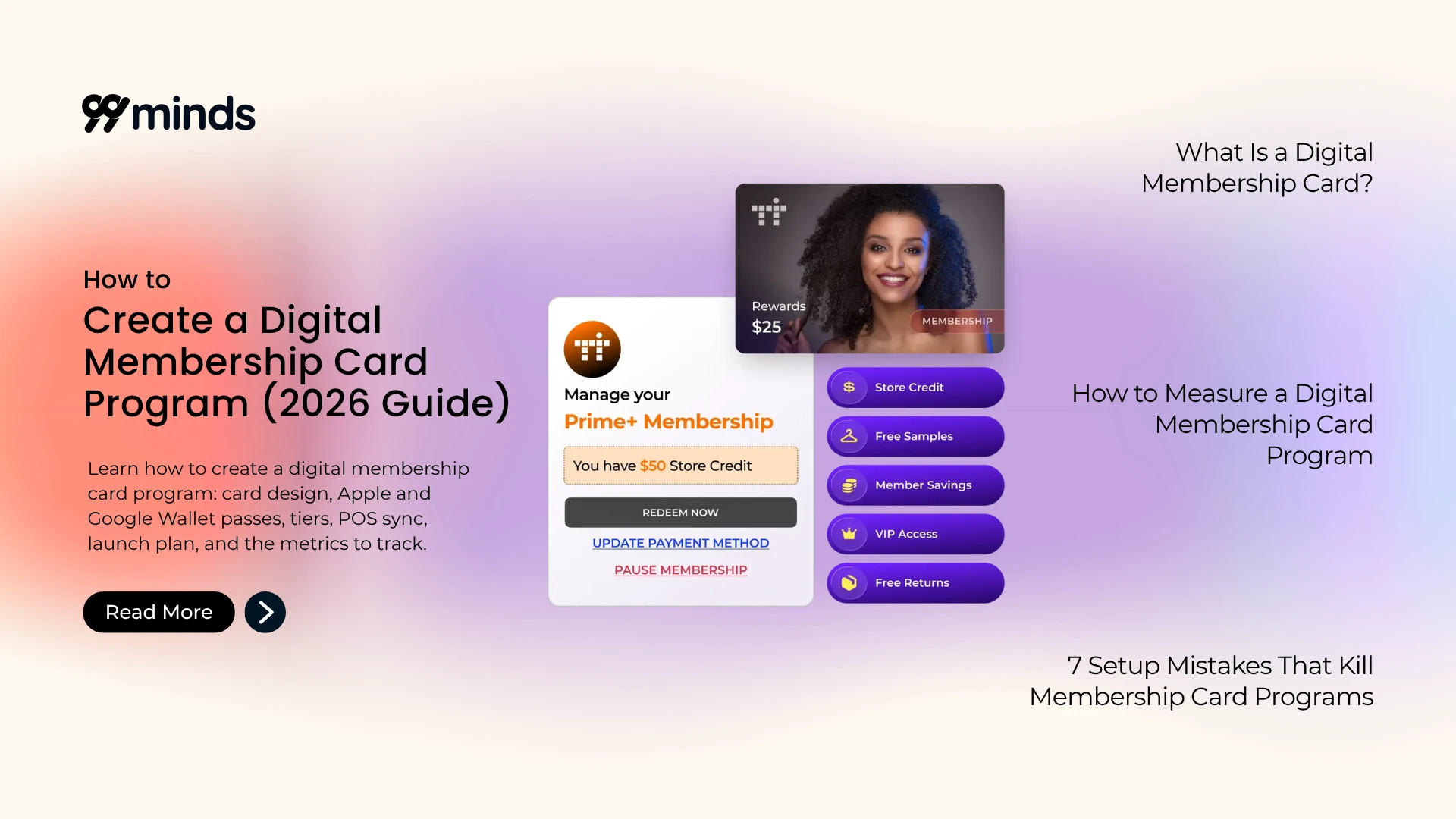
A digital membership card gives customers instant access to their membership details, benefits, credits, and rewards without carrying a physical card or downloading another app.
Members of a retailer’s loyalty program generate 12% to 18% more revenue than non-members, according to Accenture research, so a card members actually carry and use matters.
For ecommerce and retail brands, however, a digital membership card can be much more than a replacement for plastic. When connected to your store, POS, customer account, and loyalty or rewards system, it can become a persistent member identity that works across online and in-store shopping.
That is where wallet-based membership cards become particularly useful.
A customer can add a membership pass to Apple Wallet or Google Wallet, receive updates as their membership changes, access their benefits when they visit a store, and interact with your brand without opening a dedicated app.
A digital membership card is a mobile wallet pass that verifies someone is a member of your program. It’s one of several kinds of mobile wallet passes, sitting in Apple Wallet or Google Wallet alongside boarding passes and payment cards.
It typically holds a member’s name, tier, member ID, renewal or expiry date, and a barcode or QR code your staff can scan. The important part isn’t that it’s on a phone, though. It’s that it’s live: when a member upgrades from Silver to Gold, the card in their pocket changes, and when they earn store credit, the balance on the back updates. Nobody reprints anything and nobody downloads a new card, which is what separates it from the other cards in your customer’s wallet. Staff scan the code at checkout or the register, and the system checks it against your member database in real time.
| Digital membership card | Digital loyalty card | Punch or stamp card | Plastic membership card | |
|---|---|---|---|---|
| What it stores | Identity, tier, member ID, renewal date, access rights | Points or reward balance | Visit count | Name and a printed number |
| How it updates | Automatically, over the air | Automatically, over the air | Manually per visit | Never, you reprint |
| How it's verified | Scan the barcode or QR, checked against your member database | Scan or account lookup | Visual or scan | Visual only, easy to fake |
| Best for | Paid tiers, VIP programs, gated access, recurring memberships | Rewarding spend across all customers | Simple repeat visits at a single location | Nothing, in 2026 |
The difference from a digital loyalty card comes down to what’s being verified: identity and entitlement, versus an accumulated points balance.
You’ll see “digital membership card,” “membership card app,” and “virtual membership card” used interchangeably. They usually mean the same thing, with one exception: a card that only lives inside a company’s own app is a different product from a wallet pass. The app version needs a download, needs updates, and gets deleted. The wallet pass doesn’t.
If you want to see what one looks like before you build anything, you can mock one up with 99minds’ free wallet pass creator and preview the Apple and Google versions side by side.
See a Digital Membership Card in Action
Preview a Member Pass in Apple and Google Wallet before you build anything, no design work required.
This is the decision that shapes everything else, and it’s the one most guides skip entirely.
A free membership is about capture and segmentation. Anyone can join, you get their contact details and purchase history, and you use tiers to reward people as they spend more.
It grows fast, since there’s no barrier to joining. It also means every perk you hand out comes straight off your margin, because nobody paid to get in. Free membership works best when the goal is data and volume rather than immediate revenue, building a segmented list you can market to, then using the tier ladder itself to push spend upward over time.
A paid membership flips that. It runs on the same recurring-revenue logic as any subscription business model: members pay a fee up front, which means you have revenue before you deliver a single perk, and members who paid tend to actually use what they paid for.
It grows slower and demands more from you, because a paid tier has to be obviously worth the fee. That means the perks, the pricing, and the renewal experience all have to hold up to real scrutiny from day one, not just at launch. Here’s the test: work out what a member has to spend for the fee to pay for itself. If your membership is $49 a year and includes free shipping plus five percent back in store credit, a customer spending $600 a year gets roughly $30 in shipping and $30 in credit. That’s break-even at $600. Now ask whether your average customer spends that. That break-even number is really a customer lifetime value calculation done in miniature, one perk cycle at a time. If your customer doesn’t hit it, either the fee is too high or the perks are too thin.
Perks that make a paid tier worth buying:
Notice that only one of those is a straight discount. That’s deliberate, and we’ll come back to why.
You also need a plan for what happens when the money stops: a card payment fails, or somebody chooses not to renew. Decide now:
Get this wrong and your best customers find out they’ve been downgraded while standing at the register. Get it right and most of them just renew.
Open a spreadsheet before you open any software. You need four columns: tier name, entry condition, perks, and estimated cost to serve per member per year.
Entry conditions usually come in three flavors. Spend-based (cross $500 in a year and you’re Gold), visit-based (10 visits gets you in), or paid (you buy the tier). You can mix them, but pick one primary trigger so members can explain your program to a friend in one sentence.
Then decide how many tiers you actually need. Two or three is almost always right. Five tiers looks impressive in a deck and confuses everyone in real life, because nobody knows what they are or what’s next.
Now the part people skip: cost to serve. For each perk, estimate what it costs you per member per year. Free shipping has a real number attached to it. So does five percent back. Add them up per tier, compare against what that tier’s members actually spend, and you’ll immediately see which perks are affordable and which ones are a slow leak.
For every perk you plan to offer, define it completely before it goes live:
Skip this and you’ll end up improvising an answer the first time a customer asks a question your rules never covered.
One rule to carry into this step: perks that are only discounts will quietly destroy your margin. Discounts train people to wait for the next one, and they attract exactly the customers who’d have bought on sale anyway. Mix in access, service, and credit. Access costs you nothing. Service costs you a little. Credit keeps the money in your business.
Once your program exists on paper, you can judge tools against it instead of being sold to.
Here’s the checklist to run every vendor through. For each one, there’s the capability itself, why it matters, and the question that gets you a straight answer:
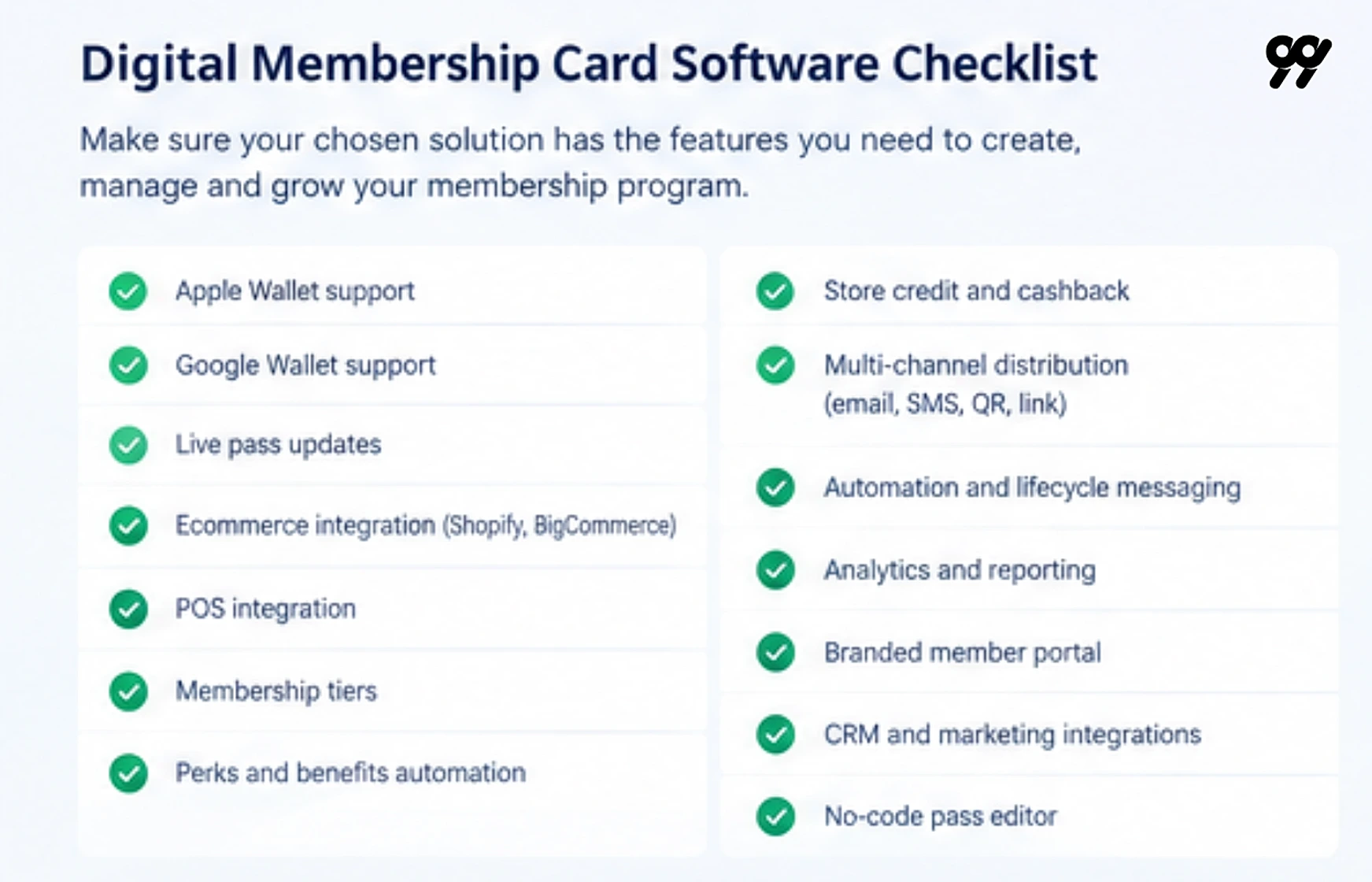
Before you start booking demos, run a handful of membership platforms through this exact checklist side by side, rather than judging on a sales deck alone.
There’s a second question underneath all of this: buy or build?
Apple and Google both publish documentation for issuing wallet passes yourself (Apple Wallet passes and the Google Wallet API), and if you have engineering time, a basic pass isn’t hard to generate. The hard part is everything after.
Push updates when a tier changes, a scanning flow your store staff can use, handling a member who changes phones, keeping the pass in sync with orders in both directions, and reporting. That’s a product, not a sprint. Building your own makes sense if membership is your product. For almost everyone else it’s a distraction.
On budget, published pricing in this category tends to land in the low hundreds per month for entry-level tools, rising for mid-market platforms with POS and ecommerce integrations. Ask for pricing at your actual member count, not the headline plan, since most pricing scales with members.
And do the comparison against what you spend today:
| Cost line | Plastic card program (per 1,000 members) | Digital membership cards |
|---|---|---|
| Card printing | Per-card cost, plus setup for a design change | None |
| Envelopes and postage | Per member, every year | None |
| Reissues for lost cards | Ongoing, unpredictable | None |
| Design changes | Reprint the whole batch | Update the template, all cards refresh |
| Staff time issuing cards | Per new member | Automated |
Fill in your own numbers. Most brands find the postage line alone covers the software.
This is where good programs separate themselves, and almost nobody gives it the attention it deserves.
The front of the card should carry your logo, the member’s name, their tier, their member ID, and the scannable code. That’s it. A wallet pass is small and gets glanced at for two seconds at a register. Anything else is noise.
The back of the card is where the detail goes: a short perks summary, credit or points balance, expiry or renewal date, a support link, and your terms.
Here’s what that looks like put together on a Gold tier pass:
Gold Member Sarah Johnson, Member #10482 10% member pricing, $25 store credit Valid through December 31, 2026 Scan to identify member
Notice what isn’t there: no fine print, no terms, no support email crammed onto the front. Prioritize whichever field matches how the card actually gets used. A card that’s mostly scanned at checkout needs the code front and center. A card that’s meant to remind members of a perk needs the tier and that perk right up top.
Not every field needs to be dynamic. Tier, balance, next perk, and renewal date should all update automatically, while your logo and terms link can stay fixed. That distinction matters more than it sounds, because a card with only static fields is just a picture of a card. One with dynamic fields becomes a channel you actually own on your customer’s home screen.
Apple and Google also render passes differently from each other. Layouts, image sizes, and how fields wrap aren’t identical across the two, so preview both before you ship anything. A pass that looks balanced on iOS can look cramped on Android.
Choosing between a barcode and a QR code comes down to what your scanners can actually read. Most modern POS scanners handle both, though older laser scanners often only pick up 1D barcodes. Whichever you choose, encode an opaque member ID and nothing else, and never put a name, email, or anything personal in the code itself.
Contrast is a real constraint too, since the card gets scanned in a dark store by people in a hurry. Test your color choices on an actual phone at low brightness rather than on your monitor.
You can set all of this up without a designer using 99minds’ mobile wallet marketing software, which includes a visual editor, a template library, and a side-by-side preview of both formats.
Build Your Digital Membership Card Program with 99minds
Design the pass, set your tiers, sync your store and POS, and automate renewals from one platform.
A card is a key. This step is about what it unlocks.
Online, perks should apply at checkout without the member doing anything. If a Gold member has to remember a code, you’ve built a coupon program with extra steps, not a membership. Free shipping should just be free, and member pricing should just be the price they see.
In store, the sequence is simpler: the member shows the pass, your staff scan it, the perk applies at the register, and the visit gets recorded against their profile.
Store credit and cashback deserve their own decision, since credit differs from loyalty points in one important way. It’s denominated in money, so members understand it instantly and it always gets spent with you.
If you’re issuing cash back as a member perk, 99minds’ store credit software puts that balance on the same customer record as the membership, which means it can show right on the back of the card.
Margin usually leaks through stacking rules nobody wrote down. Can member pricing stack with a sale price? Can a member use a coupon on top of their member discount? Can store credit apply to an already discounted order? These are the same questions any coupon stacking policy has to answer, just scoped to a membership discount instead of a promo code.
What happens when a member pays with a gift card and also has credit? There’s no universally right answer here, but there is a universally wrong one: finding out after launch.
Expiry deserves the same care. Unredeemed credit that quietly disappears is the same breakage problem gift card issuers already manage, and it deserves the same warning-first treatment: a reminder at 30 days and again at seven costs you nothing.
It helps to write the exact rule for each benefit type instead of just the general idea. A member discount, say 10% off for Gold members, needs the eligible and excluded products spelled out, a minimum order value, whether it applies online and in store, whether it stacks with coupons, and what happens when a member changes tiers.
Store credit, say $10 after a spending threshold, needs to define how it’s earned, where the balance lives, when it expires, and whether a partial balance can be used.
Cashback, three percent on eligible purchases for example, needs the qualifying transactions defined, how it’s calculated, how long it stays pending, and how a refund affects it.
The more precisely each rule is written down, the fewer edge cases your support team has to improvise an answer for.
Test these scenarios before you launch, all of them, on a real phone, at a real register:
Here’s the failure mode that quietly ruins membership programs: the online program and the in-store program are two different systems. A member earns in one and can’t spend in the other, and they stop trusting the whole thing.
On your store, install the app on Shopify or BigCommerce and your customer records, order history, and tags sync automatically. That’s what lets a spend threshold trigger a tier upgrade without anyone touching a spreadsheet.
Your POS matters just as much. Square, Lightspeed, and Clover are the common ones, and the flow should be simple: the member presents the pass, staff scan it, the perk applies, and the visit gets recorded. If your platform can’t scan at the register, you don’t have an omnichannel membership, you have an online one with a card attached.
Your CRM and email tools are where the lifecycle messaging actually goes out, whether that’s Salesforce, HubSpot, Klaviyo, Omnisend, or Mailchimp. Membership data like tier, renewal date, and credit balance needs to reach them, or your emails will address a Gold member like a stranger.
Before you connect any of it, map the fields once:
| Membership field | Ecommerce or POS equivalent |
|---|---|
| Member ID | Customer ID |
| Customer email | |
| Tier | Customer or member segment |
| Membership status | Active or inactive |
| Credit balance | Store credit balance |
| Expiry date | Membership expiry |
| Rewards | Loyalty or reward balance |
This mapping is what prevents the most common failure in an omnichannel membership program: two systems quietly creating two different records for the same person. For each field, decide which system owns it. The membership platform usually owns tier status, the ecommerce platform owns contact details, and the POS records the in-store purchase.
If you’re migrating from plastic cards or a spreadsheet, a CSV import gets your existing member list in with their current tier intact. Do this before you announce anything, so existing members don’t get treated as new signups.
Every manual step in your program is a step that eventually doesn’t happen. Map your triggers once and let them run.
A complete lifecycle runs through six stages, each with its own trigger and its own message:
Personalize by behavior, not just by stage. A member who’s never redeemed anything needs an onboarding nudge, while a member approaching a tier threshold responds better to a progress update than a generic reminder.
A wallet pass can also send lock-screen notifications, which is a genuinely powerful channel and exactly why it’s worth using sparingly. A renewal reminder, a tier upgrade, and a member-only launch are worth a push. A weekly newsletter is not, and the fastest way to get a pass deleted is to treat it like an email list.
Geofencing lets the card surface on the lock screen when a member is near your store. Used well, that’s a nudge at the moment it matters. Used badly, it’s creepy, so keep it to one store and one relevant message.
All of the above runs through automated workflows in 99minds, so renewal reminders and perk distribution happen without anyone remembering to send them.
You’ve built the thing. Now people have to actually join, and then they have to actually install the card.
Distribution channels that work:
The install prompt matters more than the signup, and this is the single most common mistake in the category. A member who signs up but never taps “Add to Apple Wallet” has no card, gets no push notifications, and forgets your program exists within a week. Send the pass link immediately after signup, then follow up once at 48 hours if they haven’t installed it.
Your store staff don’t need a script, just two sentences: “We’ve got a members program, it’s free to join and you get five percent back as store credit. Want me to scan you in? Takes 10 seconds.” Then let them scan the QR at the counter.
Watch enrollment and install rate weekly for your first 90 days. If enrollment is healthy but installs are low, your delivery is broken. If enrollment itself is low, your offer isn’t clear enough at the point where you’re asking.
Most brands measure signups and stop. That tells you almost nothing. Here’s the fuller set:
| Metric | What it tells you | What to do if it's low |
|---|---|---|
| Enrollment rate | Whether the offer is compelling where you're asking | Move the ask to checkout, or make the top perk clearer |
| Pass install rate | Whether members actually got the card onto their phone | Fix the delivery. Send by SMS and add a 48-hour reminder |
| Active member rate | Whether the card is used, not just held | Look at perk relevance and push frequency |
| Redemption rate | Whether perks are reachable and worth reaching | Lower the friction before you increase the value |
| Member vs non-member repeat rate | The number that justifies the program | Compare cohorts, not averages |
| Member AOV lift | Whether membership changes basket size | Check whether perks encourage bigger orders or just cheaper ones |
| Renewal rate (paid programs) | Whether the fee felt worth it | Look at what renewers used that lapsers didn't |
| Churn | Members going quiet | Segment by tier. Churn usually concentrates in one |
A note on benchmarks: you’ll see confident numbers quoted around for all of these, and most of them come from nowhere in particular. Your own baseline is more useful than someone else’s average. Measure your own first 90 days, then set out to beat that.
The comparison that actually justifies the program is member vs non-member repeat rate, since that’s the number that isolates what membership itself is doing for repeat customers, rather than what your brand would have driven anyway. The reports in 99minds break issuance, redemption, and expiry down by campaign, so you can see which tier and which perk is doing the work.
A digital membership card program can improve customer convenience, increase repeat purchases, and make membership benefits easier to access. However, the program can underperform if the card is treated as a standalone asset instead of part of a connected customer experience.
Avoid these common mistakes when planning, launching, and managing your digital membership card program.
A digital membership card should do more than replicate the information printed on a physical card.
A static pass may show a member name, membership number, barcode, or expiration date, but it does not give customers a strong reason to keep checking or using it. If the information never changes, customers may forget about the pass or remove it from their wallet.
Use the digital pass as an ongoing communication and engagement channel. Depending on your software and wallet setup, you may be able to update relevant information such as:
For example, when a customer moves from a standard tier to a Gold tier, the pass should reflect the upgrade and communicate the new benefits. If a member earns store credit, the updated balance can give them a reason to return and make another purchase.
The goal is to make the pass useful throughout the membership lifecycle, not only at signup or checkout.
Many brands make it easy for customers to join a membership program but fail to make the next step clear.
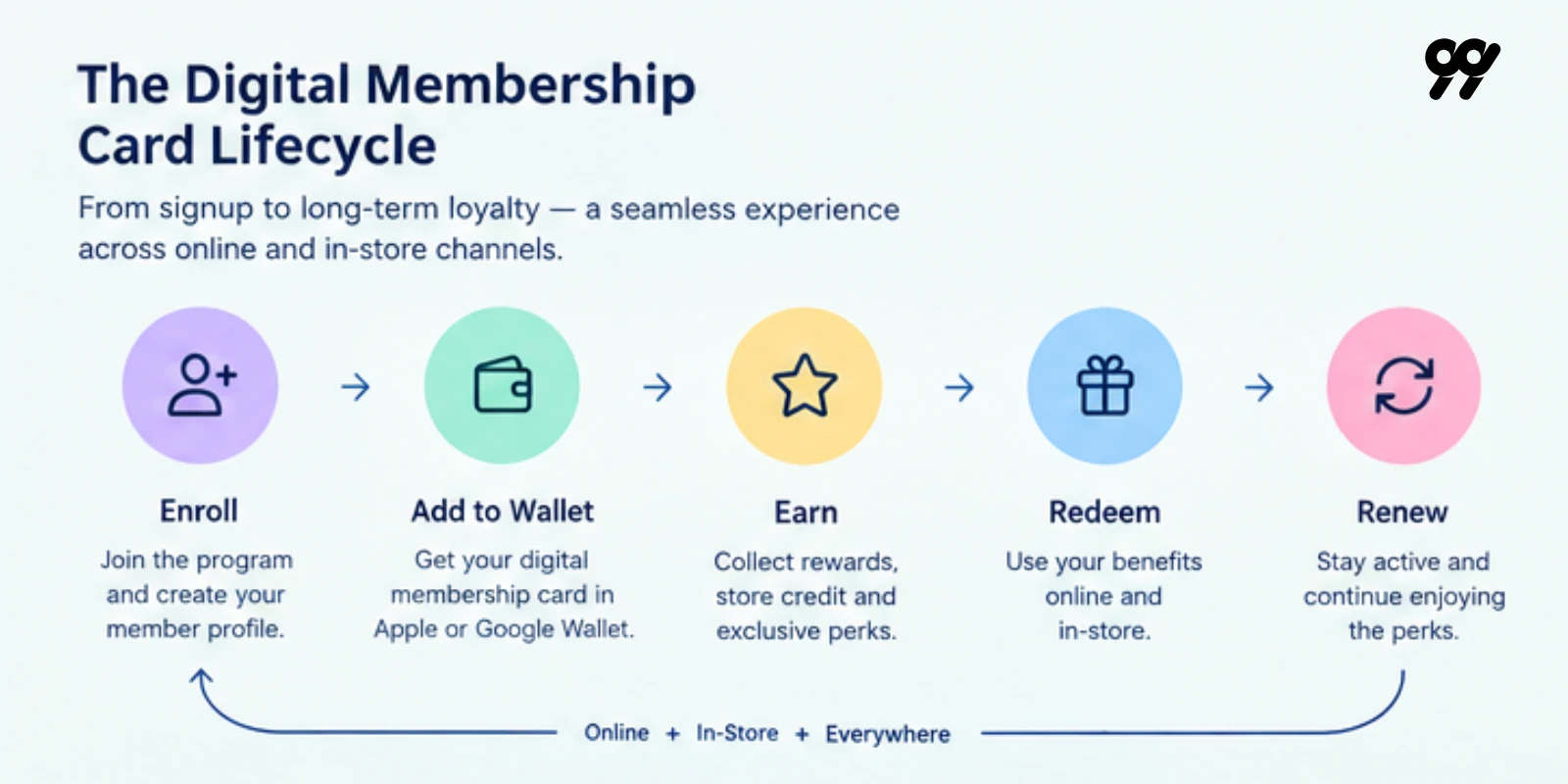
A customer may complete a signup form, receive a confirmation email, and still never add the membership card to Apple Wallet or Google Wallet. This creates a gap between membership enrollment and actual digital membership adoption.
The ideal customer journey should be:
Join → Add to Wallet → Use Benefits
Make the pass install action visible immediately after signup. You can include it in:
Use clear calls to action such as:
Do not assume customers will search for the pass later. The highest-conversion moment is usually immediately after enrollment, when the customer is already engaged and expecting confirmation.
Multiple membership tiers can make a program appear sophisticated, but too many levels often create confusion for both customers and employees.
If customers cannot quickly understand how to qualify for a tier or what benefits they receive, they may not see enough value in progressing through the program. Staff may also struggle to explain the differences between tiers, especially when benefits overlap or have complicated restrictions.
Before launching, make sure each tier has a clear purpose. For every tier, define:
A simple structure with two or three tiers is often easier to communicate and manage. For example:
Start with a manageable structure and expand only when customer data shows that additional tiers would improve engagement or revenue. If you do add more tiers, make the differences obvious. Customers should be able to understand the value of moving up without reading a complicated terms and conditions page.
Discounts are easy for customers to understand, but relying on discounts for every membership benefit can reduce profit margins and train customers to wait for lower prices.
A strong membership program should provide value without making every interaction dependent on a percentage-off promotion. Consider combining discounts with benefits that create exclusivity, convenience, recognition, or access, such as:
Different benefits can appeal to different customer segments. A frequent shopper may value free shipping, while a brand enthusiast may care more about early access or exclusive products.
When planning benefits, evaluate both customer value and business cost. A benefit should encourage the behavior you want, such as repeat purchases, higher order values, or longer retention, without creating unnecessary margin pressure.
A customer should not have one membership identity online and another identity in store.
If your ecommerce platform, POS, CRM, and membership system do not share customer information, members may experience problems such as:
Connect the membership record to the systems that manage customer activity. Important fields may include:
The objective is to create one consistent member identity across the customer journey:
Website → Customer account → Membership card → POS → CRM → Marketing
Test the experience from the customer’s perspective. A member who joins online should be able to use the same membership in a physical store without creating another account or explaining their status to staff.
A membership program may work correctly during signup and still fail during less common but important situations. These failures can damage trust because customers usually notice problems when they are trying to redeem a benefit or complete a purchase.
Test the following scenarios before launch:
Create a test matrix with the expected result for each scenario. Include ecommerce staff, store employees, customer support, and marketing teams in the testing process so the full member experience gets reviewed.
The total number of members is useful, but it does not show whether the program is creating value. A brand may have thousands of enrolled members while only a small percentage install the digital card, redeem benefits, or make repeat purchases.
Measure the complete member journey:
Install → Engage → Purchase → Redeem → Repeat → Renew
Track metrics such as:
Each metric answers a different question. For example:
Review these metrics regularly and use the results to improve the program. The goal isn’t simply to collect more members. It’s to create a membership experience that customers use, value, and renew.
Three things decide whether this works.
Decide free vs paid before you touch software, because that one choice determines your perks, your pricing, and your entire renewal flow.
The card is only as good as the systems behind it. A beautiful pass that doesn’t scan at your register or apply a perk at checkout is a picture, not a program.
The install prompt is where programs are won and lost. Signups feel like progress. Installs are progress.
If you’re running on Shopify or BigCommerce and want the card, the tiers, the store credit, and the renewals in one place instead of four, that’s exactly what the 99minds built is for. Book a demo with our team and we’ll show you a Member Pass running against your own store.